
Common tasks
Step-by-step instructions for the things you’ll do most often. All of these are supported by the plugin as shipped; pages assume the block editor.
Add a listen, watch, read, or other kind post
Section titled “Add a listen, watch, read, or other kind post”- Go to Posts → Add New Post.
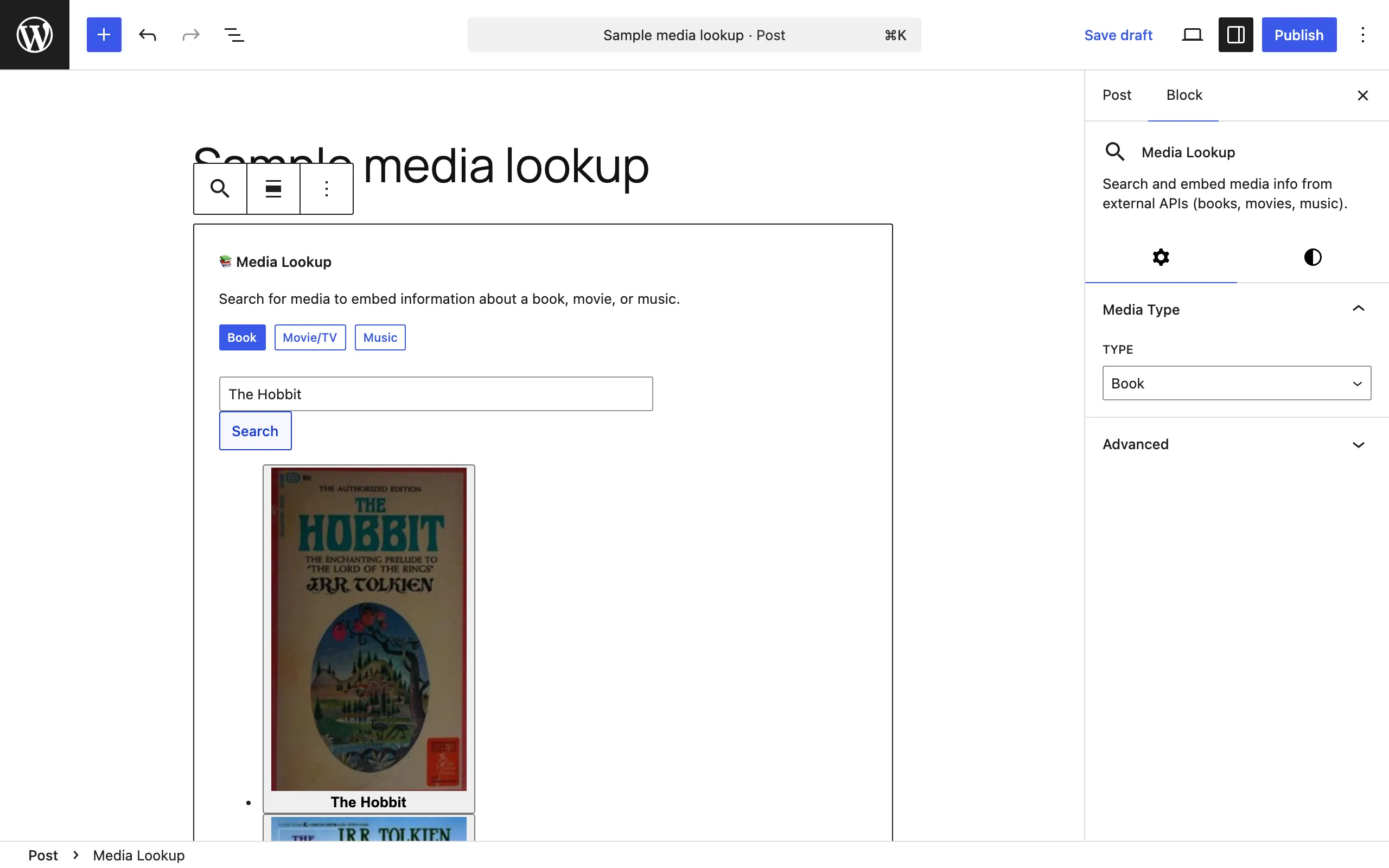
- Insert the matching card block from the Post Kinds for IndieWeb in Block Themes inserter category (Listen Card, Watch Card, Read Card, Checkin Card, Play Card, and so on).
- Search for the media in the card (or use the Media Lookup block for a universal search across services), or fill fields manually.
- Publish. The post’s kind is set automatically from the first card block in the post; a manual kind choice in the Post Kind panel is never overridden.
Assign a kind without a card block
Section titled “Assign a kind without a card block”For kinds that have no dedicated card (note, article, event, photo, video, review, recipe) or any post you want to label:
- In the post editor sidebar, open the Post Kind panel.
- Pick the kind from the grid.
- Publish. The post gets microformats2 markup for that kind and appears on its
/kind/<slug>/archive.
You can also assign kinds from the Kinds column in quick edit on the Posts list.
Add API keys so media search works
Section titled “Add API keys so media search works”- Go to Reactions → API Connections.
- Pick the service (TMDB for movies/TV, RAWG or BoardGameGeek for games, Hardcover or Google Books for books, and so on). Each card links to the provider’s sign-up page.
- Paste the credential(s) and save, then use the connection test to confirm.
MusicBrainz (music) and Open Library (books) work without keys.
Add a check-in with controlled location privacy
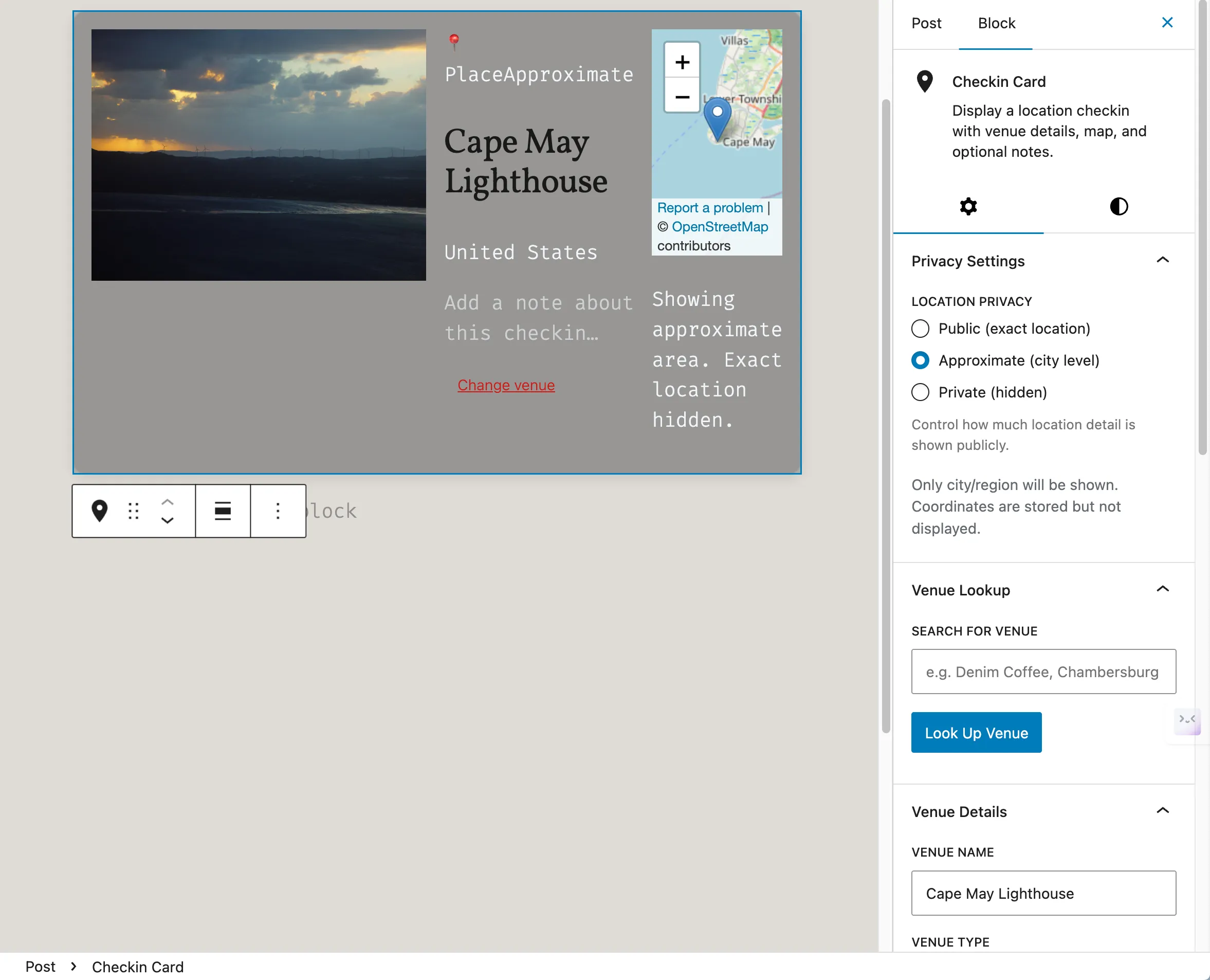
Section titled “Add a check-in with controlled location privacy”- Insert a Checkin Card in a new post.
- Search for the venue (OpenStreetMap works without a key; Foursquare needs an API key) or enter it manually.
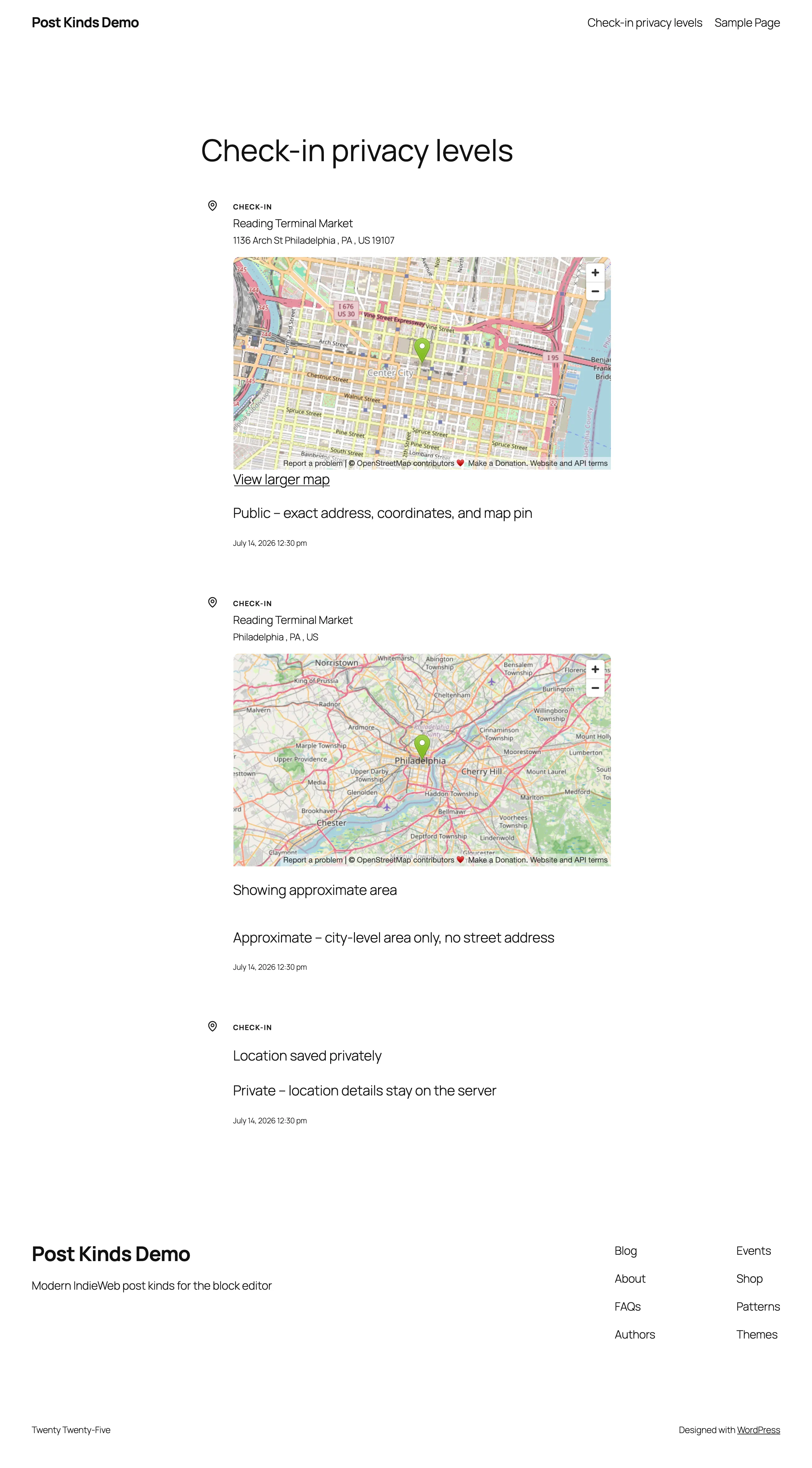
- Set the card’s location privacy — public, approximate, or private — or rely on the default from Reactions → Settings → Checkin.
- Publish. Check-ins show the venue, address, map and coordinates to everyone unless the privacy is private, which hides them. Approximate limits only geotagged posts without a venue, which then show the place name, city, region and country.
Display your check-ins on a page
Section titled “Display your check-ins on a page”Add one of these blocks to any post or page:
- Check-in Dashboard — grid, map, or timeline of check-ins with optional stats and filters.
- Check-ins Feed — a recent-check-ins list with optional map and column settings.
- Venue Detail — one venue’s info, map, and recent check-ins there.
Import your history from another service
Section titled “Import your history from another service”- Connect the service under Reactions → API Connections (for example Last.fm, Trakt, Hardcover, Readwise, Foursquare).
- Go to Reactions → Import.
- Use Preview to check what would be imported, then Start Import.
- Large imports run in the background; watch progress under Active Imports or via the admin notice. Re-sync fetches new items later.
Running an import again skips listen, watch and read items that are already on your site in any status, including drafts and trash. To import one of those items again, delete its post permanently.
Subscribe to everything, including imports
Section titled “Subscribe to everything, including imports”Your site’s normal feeds leave out bulk-imported posts. The firehose feed includes them:
/firehoseor/feed/firehose/— standard RSS2, everything your normal feed carries plus imported posts.?feed=firehoseworks too, on any permalink setting.
Point a feed reader at it to follow your complete activity, imports and all. If it returns 404 after an update, see Troubleshooting.
Give kind posts a featured image automatically
Section titled “Give kind posts a featured image automatically”Six media kinds set their artwork as the post’s featured image when the post has none: listen and jam (album cover), watch (poster), read (book cover), play (game cover), and check-in (venue photo).
- An image you set yourself always wins — the plugin never replaces it, and it respects your removing the automatic one.
- The same artwork feeds Yoast SEO’s schema graph as the primary image when Yoast finds none itself.
- To turn the behavior off:
add_filter( 'pkiw_set_featured_from_artwork', '__return_false' ); - To backfill posts that existed before this feature:
wp postkind featured-artwork backfill(add--dry-runto preview).
Set up automatic scrobbling via webhooks
Section titled “Set up automatic scrobbling via webhooks”- Go to Reactions → Webhooks.
- Copy the webhook URL for your service (Plex, Jellyfin, Trakt, ListenBrainz, or generic) into that service’s webhook settings.
- Generate and configure the secret key so deliveries are signature-verified.
- Confirm incoming events in the Webhook Log; posts are created automatically as you play or watch things.
Turn on POSSE syndication to Last.fm, Trakt, or Foursquare
Section titled “Turn on POSSE syndication to Last.fm, Trakt, or Foursquare”POSSE = Publish on your Own Site, Syndicate Elsewhere. Nothing is sent until you enable it.
- Connect the target service under Reactions → API Connections (Last.fm authorization, Trakt OAuth, or Foursquare OAuth).
- Enable the matching toggle: Scrobble to Last.fm (Listen tab), Sync to Trakt (Watch tab), or Sync to Foursquare (Checkin tab).
- Publish a post of that kind; check Reactions → Syndication for its status, or use “Syndicate Now” on skipped posts.
Post from a mobile app via Micropub
Section titled “Post from a mobile app via Micropub”- Install and configure the separate Micropub plugin and an IndieAuth setup (for example the IndieAuth plugin).
- Sign in to a Micropub app with your site URL and publish.
- Post Kinds for IndieWeb in Block Themes converts the incoming post into the right card block and assigns the kind (it detects listens, watches, reads, check-ins, RSVPs, likes, reposts, bookmarks, replies, and more, and handles photos and
geo:locations).
Change which category kind posts get
Section titled “Change which category kind posts get”- Go to Reactions → Settings → General.
- Set Default category (or “— None —” to disable). It’s applied once at first save to stream-shaped kind posts, and you can still remove it per post.
Keep post formats and kinds in sync
Section titled “Keep post formats and kinds in sync”- Go to Reactions → Settings → General.
- Leave Sync Post Formats to Kinds on (the default) and adjust the mapping table if you want different pairings (for example Audio → listen, Link → bookmark).
Confirm your microformats are valid
Section titled “Confirm your microformats are valid”- Publish a kind post.
- Visit pin13.net/mf2 and enter the post URL.
- The parser shows the detected microformats. What you want is the kind’s property
(
u-listen-of,u-like-of,u-in-reply-to,p-rsvp, and so on) nested inside the post’sh-entry— not sitting beside it.
The plugin supplies the h-entry root itself on single posts, so this works on any block
theme — including ones whose single template never calls post_class(), such as Twenty
Twenty-Five and Twenty Twenty-Four. If your theme already provides the root, the plugin
steps aside rather than nesting a second one.
If the property parses outside the h-entry
Section titled “If the property parses outside the h-entry”On 1.1.0 and earlier the root came only from post_class(), so on those themes the card
parsed as a standalone top-level h-cite and the property never attached. Updating to 1.5.0
or later fixes it. If you see it on a current version, parse the post’s archive URL as well
(/kind/listen/, for example) and open an issue
with both results — that pair tells us whether the theme or the plugin is at fault.
Clear cached API data
Section titled “Clear cached API data”- Go to Reactions → Settings → Tools.
- Use Clear API Cache, Clear Metadata Cache, or Clear All Caches — useful when a lookup returned stale or wrong metadata.
Route activity kinds into a stream instead of the main archive
Section titled “Route activity kinds into a stream instead of the main archive”For theme-savvy users: the plugin can classify kinds as “stream” (short activity posts) vs “main” (long-form) without ever filtering your queries — your theme decides what to do with the signal.
-
Add the
pkiw_stream_kindsfilter in your theme or a small plugin, per the readme example:add_filter( 'pkiw_stream_kinds', fn() => [ 'checkin', 'eat', 'drink', 'listen', 'jam' ] ); -
To promote an individual post back to the main archive, use the Promote to main archive toggle in the editor’s Post surface panel (or the
pkiw-promoteMicropub property). -
After a bulk import, run
wp postkind surfaces backfillonce (WP-CLI).